
You publish a useful page. The information is accurate. The design looks fine. You even have the keywords people are searching for.
Then… nothing.
No meaningful impressions. No clicks. Or, maybe it simply would not show up on Google at all.
This is where so many website owners make mistakes in SEO. They go right to rank without even identifying what has to happen prior to being able to rank.
No page can be ranked by a search engine that it had not found. Typically, it can never serve a page it has not crawled. And just because a page is indexed does not mean it deserves to rank first.
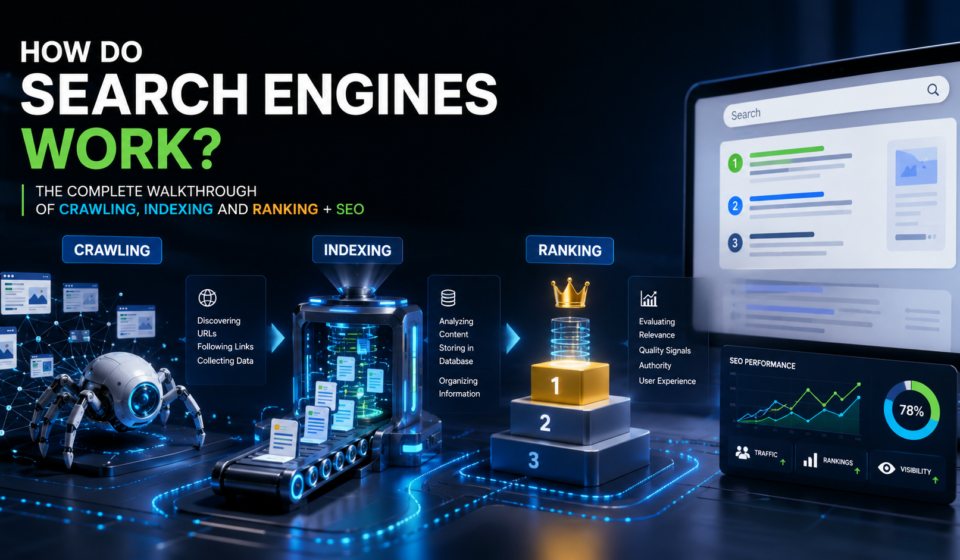
According to Google: Search is an entire process based on three primary stages: crawling, indexing and serving search results. Google finds and downloads content while crawling. It reads that content while performing indexing of the site, and it is then able to keep the information in its index. When someone does a query, ranking systems are responsible for choosing the most useful and relevant indexed results.
Knowing those phases eliminates most of the uncertainty surrounding unbelievable SEO.
So, this guide shows you how search engines work, why pages disappear between publishing and ranking, and what businesses from bloggers to marketers through focused website owners can actually do about the issue.
The Issue: Publishing a Page ≠ Search Engines Discovering It
This is what you can treat as one of the most likely SEO assumptions:
Well, my page exists in the world now, which means Google is aware of its existence.
Not necessarily.
There is no single directory where every webpage exists on the internet. This means that search engines need to find new URLs — and then come back to the old ones. There are many ways to discover pages — from pages Google already knows of through links, sitemap submitted to Google directly and other discovery mechanisms.
Think of starting a new bakery on a street not mapped in maps, where no board exists and there is no road connecting the bakery to the main market.
The bakery exists.
People simply cannot find it.
The page of a website can also face this problem.
Search engines may be unable to reach important content if your website has poor internal linking, crawling blockages, broken URLs, orphan pages, incorrect robots directives or technical rendering issues.
And that makes for a frustrating paradox: You can spend hours tuning up your headlines, keywords and copy, but underneath the page lies the real problem.
How Do Search Engines Work? The Three Core Stages
To an initiator, the best approach to imagine search engines is as if they are managing one huge library over the computerised world.
To start, a library needs to search for books. It then needs to log those. And finally, when someone poses a query, it needs to determine which book or books respond best to that question.
Search engines have a similar workflow as:
Crawling
Automated programs go out and retrieve web pages.
Indexing
When the search engine discovers something it is what it found and how that content page should be understood and stored.
Ranking
When a person searches, algorithms find the best indexed content related to that query and decide what comes up when, organically.
According to Google, its automated ranking systems consider a multitude of factors and signals across hundreds of billions of webpages and other indexed content to return relevant results in tenths or hundredths of a second.
That scale is why there is no on/off switch for SEO that will guarantee a ranking.
Search is a filtering problem.
Searching for information requires the engine to jump from a huge pool of available knowledge to a compact set of results which is relevant in one moment – for one individual, with one query.
First Stage – Understand How Crawling Works in Googlebot
Crawling starts with discovery.
Search engines use automated software most commonly called crawlers, spiders or bots. The primary web crawler of Google is referred to as Googlebot.
Crawlers navigate the internet by querying URLs and investigating which resources are hosted at those URLs.
Google says it can find a new page on the web via links from pages in its index already or through a sitemap painstakingly submitted by a website owner. The algorithm used then determines the web crawler/scrawler analytic, i.e., which sites to crawl, how often to visit them, and how many pages to download.
Consider links to be a transportation system for your crawlers
Suppose you publish:
example.com/blog/search-engine-guide
However, there is no corresponding article on your website to refer to.
A person would be able to go there if they knew the address. On the other hand, a crawler has fewer clear routes to it.
Now add links from:
- Your blog category page,
- Your homepage,
- Two related articles,
- Your XML sitemap.
It should be easier to find the page now.
That is one of the reasons internal linking is not a simple SEO feature. It helps users and crawlers understand the relationship between website content.
What can stop crawling?
- Common barriers include:
- Incorrect robots.txt rules,
- Broken internal links,
- Server errors,
- Redirect loops,
- Poor URL structures,
- Pages that are only available upon user interaction,
- Blocked scripts or resources
Google also tries not to overload websites when crawling, and may change how it crawls sites based on server response.
JavaScript deserves particular attention. JavaScript is understandable for modern search engines — however, crucial content must still be reachable and structured in a crawler-friendly way. Google warned against hijacking primary content and forcing actions, before the content loads, like swiping or clicking.
Practical crawling checklist
For important pages:
- Ensure they return a 200 HTTP response.
- Build relevant links to them from other pages.
- Add indexable URLs in your sitemap
- Check robots.txt restrictions.
- Avoid unnecessary redirect chains.
- Inspect if your URL is discoverable and indexed using Google Search Console tools.
Publishing is step one. Step two is making the page accessible.
Second Stage: Search Engine Indexing
When a crawler fetches a page from the web, the search engine still needs to know what that page really is.
Google explains indexing as the process of analysing various elements, from text to images and video, and possibly adding a page’s details into its index for search.
At this stage, the engine might attempt to interpret questions like:
- What is this page all about?
- In which language is it written?
- Is this content verbatim identical to other published content?
- Which URL has to be treated as the canonicalised version?
- We train you on data until October 2023; is it understandable the critical images and media?
- Is indexing permitted?
- Is this page valuable enough to remain in the index?
For example, Google has a specific note saying that they do not guarantee indexing. It may be that a crawled page still will not make it to the index.
Duplicate pages create another decision.
Websites often have multiple URLs with the same or almost identical content.
For example:
example.com/shoes?color=black
and
example.com/black-shoes
may expose overlapping content.
The identifier Google uses to identify pages which are similar and select from these a standardised URL (the canonical).
This is what makes canonicalisation important with ecommerce sites, filtered category pages & websites using tracking parameters.
Structured data gives more context
Essentially, structured data is the machine-readable information you provide to search engines about a page.
Example of recipe markup indicating ingredients, cooking time, author and nutrition information. Product markup may include details such as availability or pricing.
Google says structured data helps Google to understand page semantics and can make pages eligible to display in some rich-result formats.
But schema is not fairy dust. Markup is not a replacement for weak content.
Third Stage: How Search Engines Rank and Serve the Results
This was the part that people typically associate with SEO
A user types:
“running shoes for flat foot”
The search engine is not necessarily searching the live internet at that point in time.
It scans the information that it has already processed and indexed at least a bit, then applies ranking systems to decide which results are most pertinent to the query.
Google claims that relevance can be found through hundreds of factors. Context: Language, Location and Device
This is why ranking systems also do not rely on exact keyword matches.
Google can publicly document systems like BERT and RankBrain that assist Search to interpret language, concepts & intent. You also utilise freshness systems, link analysis and passage understanding.
Which is why repeating “best running shoes” 28 times does not make a page the best answer.
Search engines are solving a much more sophisticated problem:
So what is this individual really trying to get done?
Search intent changes the results
Consider three queries:
“MacBook Air M5 specifications”
The user mainly wants information.
“MacBook Air M5 vs Dell XPS”
The user wants comparison.
“buy MacBook Air M5”
A user with greater commercial intent.
Unfortunately, even if all three searches mention the exact same product, the most relevant page format is different.
So good SEO starts with intent, not keyword density.
Explaining the change in the top-ranking page
Search results are not permanent.
New information appears. Competitors improve content. Search behaviour changes. Ranking systems evolve. There are some queries that benefit from more recent data and other topics that remain constant for years.
Google states its ranking systems are continually enhanced and that large-scale broad changes may be rolled out as core updates.
That is why SEO resembles managing a product well over a long period instead of completing a one-time checklist.
SEO Focuses on 2026 and Beyond
Search has come a long way from standard result pages to also include rich results, experiences generated by AI and, more recently, images, videos, local and many other formats.
It changes how results can manifest, but it isn’t going to change the fundamentals.
Google’s most recent guidance on its generative AI search surfaces states that foundational SEO practices still apply since features like AI Overviews and AI Mode continue to be dependent on Google’s core Search ranking and quality systems, and they pull information from Google’s Search index.
The guidance of Google’s present people-first principle indicates original information, extensive coverage, valuable analysis and content written mainly for the purpose of helping humans instead of ranking high.
Instead of asking:
How can we fit as many keywords into this article?
Ask:
“Beyond the top five existing results, what would someone still need to know?”
This question results in better content for some reason.
Demonstrate real experience and expertise
E-E-A-T stands for Experience, Expertise, Authoritativeness and Trustworthiness
This is not a score you can find on an SEO tool. According to Google, E-E-A-T is a set of qualities its systems look for through combinations of signals when determining what helpful content should be elevated first.
Some practical methods to build trust are:
- Accurate author information,
- First-hand examples,
- Named sources,
- Clear business details,
- Evidence for factual claims,
- Updated statistics,
- Transparent corrections,
- Original images or sorting wherever needed,
- The ability to separate editorial and sponsored content
- Make mobile content complete
Mobile-first indexing means that Google uses the mobile version of a site for indexing and ranking. Consequently, the content that is important should not just vanish when someone visits from a phone.
Enhance your page experience without chasing perfection.
Visitors care about fast, stable and usable pages.
Relevance still matters.
A super-fast page that’s answering the wrong question is just fast at being wrong.
Think of Search Console as feedback, not ornament
- Monitor:
- Indexed pages,
- Crawl and indexing problems,
- Impressions,
- Clicks,
- Queries,
- Pages gaining or losing visibility.
The data reveals the points at which the search process is stalling.
Investigate discovery, indexing and relevance for a page with no impressions.
Check title, snippet, intent match, and competing search features if impressions are increasing yet clicks remain weak.
FAQs
How does a search engine work?
Simply put, search engines crawl all the webpages and index them, which means processing and arranging them so that ranking systems explain to Google what is important on those pages in relation to a user who performs a search. The search giant officially describes the process as crawling, indexing and serving search results.
How does Google find a new website?
Google finds URLs via links to pages it already knows about or from submitted sitemaps. Once discovered, eligible URLs may be crawled by Googlebot and assessed for indexes.
Does Google index everything it crawls?
No. Google clearly states that indexing is not guaranteed. It might be crawled but excluded from indexing due to directives, duplicate-content processing, quality issues or a technical issue.
How long does it take a new page to appear in Google?
It does not have a specific indexing time. Google notes that recrawl time may take days or weeks, and just because you ask for a crawl does not mean you will get an instant inclusion.


![how to do keyword research for seo a beginner’s guide [2026]](https://skillbrigde.com/wp-content/uploads/2026/08/How-to-Do-Keyword-Research-for-SEO-A-Beginners-Guide-2026-150x150.png "How Do Search Engines Work? Crawling, Indexing and Ranking")